

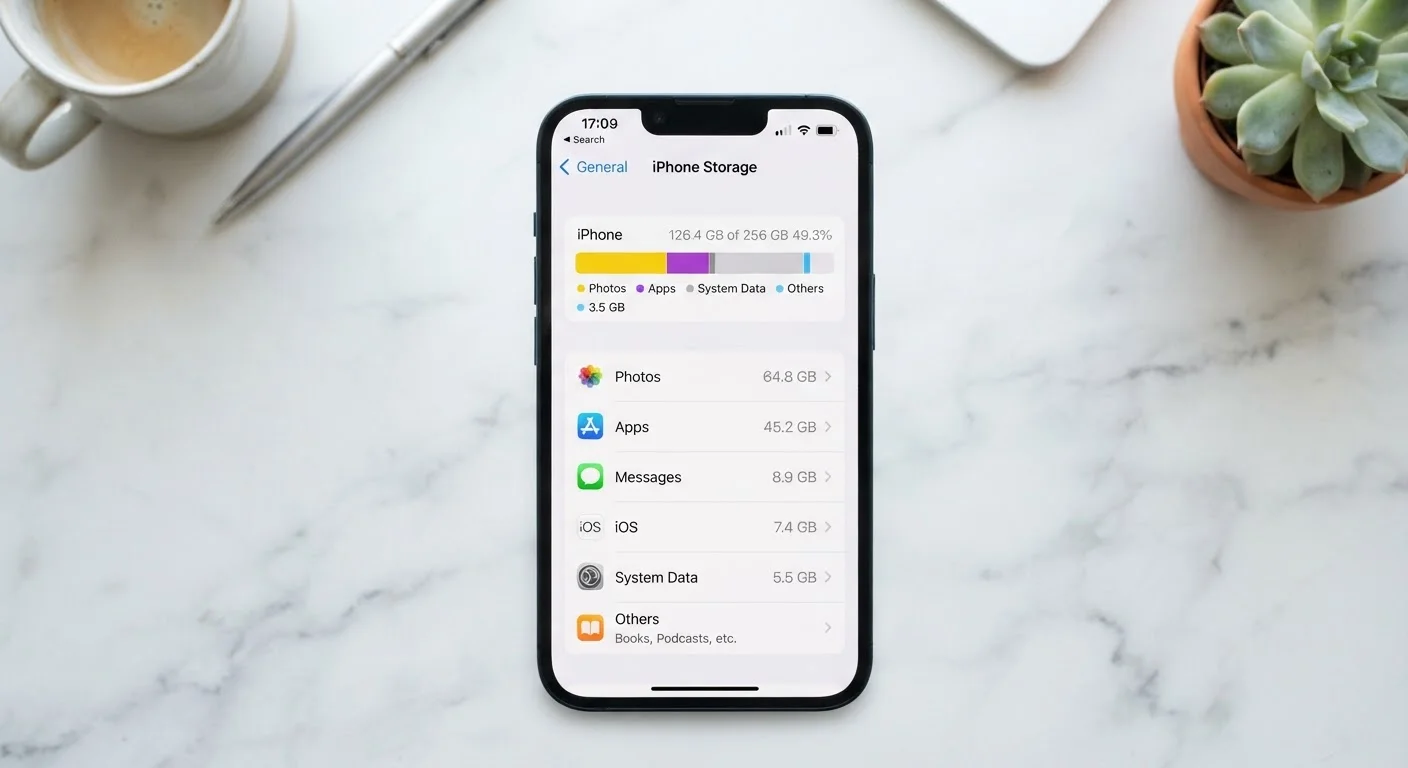
Two Numbers, Two Different Jobs
When you look up a phone's specs, you'll see two storage-related numbers - something like "128 GB storage, 6 GB RAM." These sound similar but describe completely separate things.
Internal storage is your phone's filing cabinet. It's where everything permanent lives: the photos you've taken, the apps you've installed, the music you've downloaded, the text messages you've saved. When your phone says it's running low on space, this is the storage it's talking about.
RAM (Random Access Memory) is more like your phone's desk - a temporary work surface. When you open an app, the phone loads it from internal storage onto the RAM so it can run quickly. The moment you restart your phone, the RAM wipes clean. RAM doesn't fill up with photos or downloads; it just handles whatever is actively happening right now.
RAM vs. Storage: Easy Way to Remember
Think of internal storage as a filing cabinet and RAM as the desk where you do your work. The filing cabinet holds everything long-term. The desk is where active work happens - and if it's too small, you have to keep putting things away and pulling them back out. Both matter, but they have different jobs.
Confusing these two is extremely common. If someone tells you "your phone is slow because you're out of storage," they almost certainly mean internal storage, not RAM - though both can affect performance in different ways.
What Actually Fills Up Your Phone
Most people assume apps are the main storage hog. In reality, the camera roll is usually the biggest offender. A single 4K video can run 400 MB to over 1 GB. Shoot a weekend's worth of footage and you can chew through 10 GB without trying.
Here's a rough breakdown of what typically consumes the most space, in order:
- Photos and videos - easily the largest category for most users
- App data and caches - especially social media and streaming apps that store content locally
- Downloaded files - PDFs, podcasts, offline maps, music
- Apps themselves - most are surprisingly small; a few games can be large exceptions
- The operating system - iOS and Android each take up 10-20 GB before you install anything
400 MB-1+ GB
Typical size of a single 4K video clip
Based on common recording bitrates for 4K video at 30fps on modern smartphones; actual size varies by length and compression.
10-20 GB
Storage used by the OS on a new phone
Both iOS and Android require significant baseline storage for the operating system, system apps, and firmware before any user data is added.
When internal storage gets critically full - typically below 10-15% free - your phone starts struggling. It needs free space to write temporary files, update apps, and process photos after you take them. That's often why a full phone feels sluggish even if its RAM is fine. For more on what else causes slowdowns, see what's really behind a slow phone.
How RAM Affects Your Day-to-Day Experience
Think about switching between apps. You tap Instagram, read for a minute, switch to your email, then switch back to Instagram. With enough RAM, Instagram stayed loaded in the background - you're right where you left off. With less RAM, your phone had to close Instagram to make room for email, so reopening it means starting from scratch. That pause and reload is RAM running out of desk space.
This is why phones with more RAM tend to feel snappier during multitasking, even if the processor is the same. It's not that they're doing anything faster - they're just forgetting less between tasks.
Restart Your Phone to Reclaim RAM
Restarting your phone periodically clears out RAM that lingering background processes are hoarding. If your phone feels sluggish and you haven't restarted it in weeks, that's a good first move before assuming anything is broken. It takes less than a minute and often makes a noticeable difference.
Restarting your phone periodically clears out RAM that lingering background processes are hoarding. If your phone feels sluggish and you haven't restarted it in weeks, that's a good first move before assuming anything is broken.
Reading the Numbers Before You Buy - or Before You Panic
If you're deciding how much internal storage you need, think about your habits. Light users who rely on cloud services and don't shoot much video can get by with 64-128 GB. Frequent photographers, travelers, or anyone who stores music and video locally should look toward 256 GB or more - because unlike RAM, internal storage can't usually be upgraded after purchase.
If your current phone is already running low, you have a few practical options before assuming you need a new device:
- Back up photos to a cloud service and delete local copies
- Clear cached data in Settings under Storage or App Management
- Delete apps you haven't opened in months - see how to audit and organise your apps for a methodical approach
- If your phone supports it, add a microSD card for extra space
Understanding what these numbers mean doesn't require a tech background - it just requires knowing which number to look at when something goes wrong. Storage filling up? That's your filing cabinet. Apps freezing mid-task? That might be your desk getting too crowded. Once you know which is which, the fix usually follows naturally.
For a broader look at other phone specs that work the same way - showing one number that doesn't tell the whole story - your phone's battery percentage has the same issue.
Frequently Asked Questions
Photos, videos, and cached data from apps are usually the biggest culprits, not apps themselves. A few months of camera use can fill gigabytes quickly. Check your phone's Storage settings to see a breakdown by category - you may be surprised where the space is going.
More RAM allows your phone to keep more apps open in the background without having to reload them from scratch every time you switch. It doesn't speed up individual tasks like loading a webpage, but it reduces lag when multitasking. For most everyday users, 6-8 GB of RAM is more than adequate.
Cached data is temporary information an app stores to load faster next time - thumbnails, login tokens, recently viewed content. Deleting it is generally safe; the app will simply rebuild its cache as you use it. Your personal data, like saved messages or account info, is stored separately and won't be affected.
Some Android phones accept a microSD card, which expands storage for photos and some files. Most iPhones and many newer Android models do not have a card slot, so internal storage is fixed at purchase. Cloud services like Google Photos or iCloud can offload photos to free up on-device space.
The operating system, pre-installed apps, and firmware take up space before you ever use the device. Additionally, storage manufacturers measure gigabytes slightly differently than operating systems do, causing a small numerical gap. It's normal to see 10-20 GB already used on a brand-new phone.
The content on this site is for informational purposes only and is not a substitute for professional advice. Always consult a qualified professional for guidance specific to your situation.